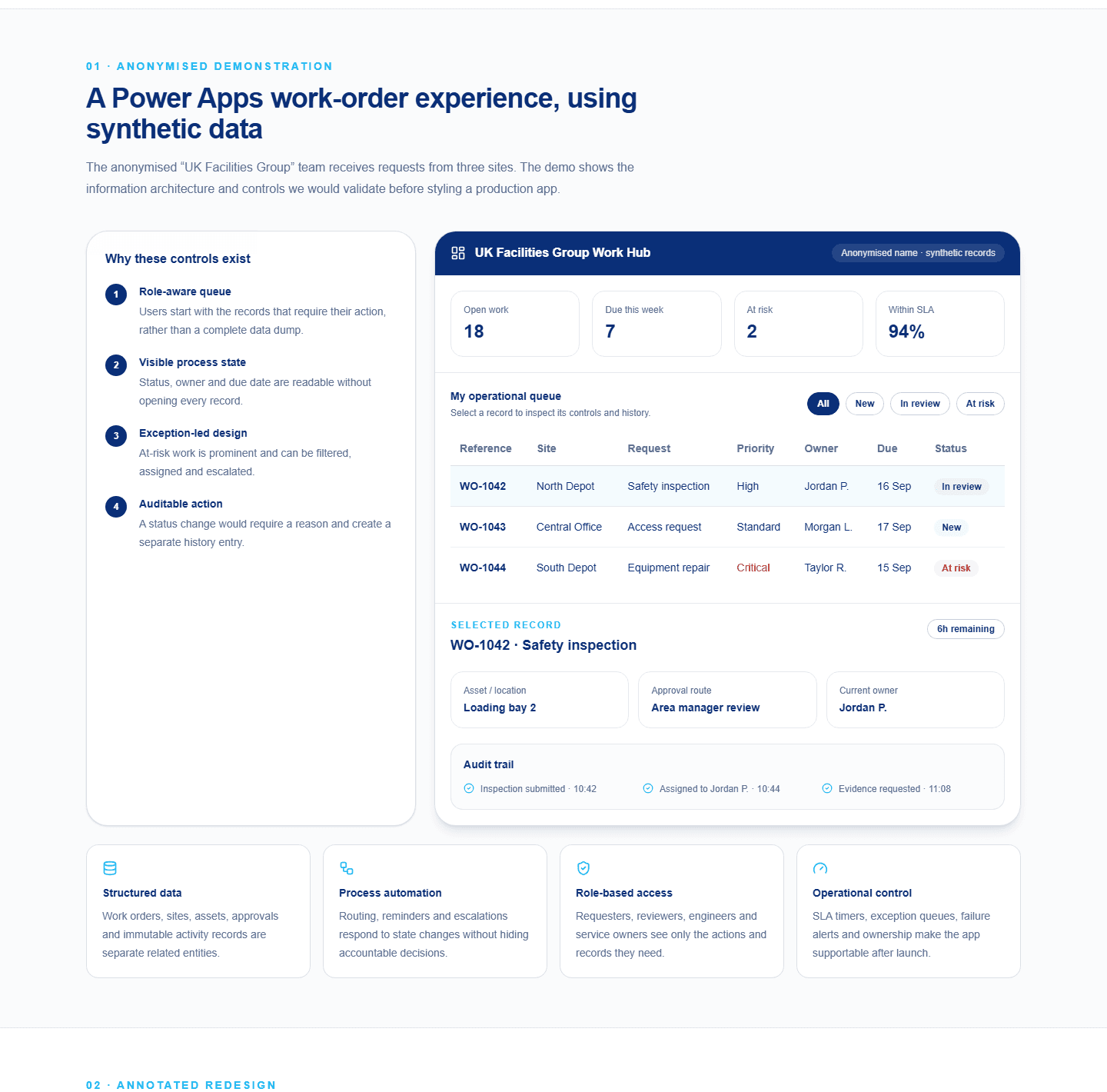
Work-order demonstration
Controls before cosmetics
Inspect the role-aware queue, visible process state, exception handling and audit trail used to shape a supportable Power Apps experience.
Explore the interactive demonstration
 Business automation services
Solvanto helps organisations design and deliver practical business automation using Microsoft Power Platform, Power Automate, Azure, SharePoint, Microsoft 365, and connected business systems. We help teams replace repetitive admin, improve workflow consistency, reduce manual errors, and create supportable automation that fits the way the business actually works.
Automation should not just move tasks around faster. It should make the process clearer, easier to own, easier to monitor, and better controlled. Good workflow automation gives teams a consistent way to complete work without relying on inboxes, spreadsheets, memory, or constant follow-up messages.
Replace repetitive admin with structured workflows
Improve routing, approvals, and notifications
Reduce errors caused by manual handoffs
Add monitoring, auditability, and supportability
Solvanto focuses on automation that removes friction from day-to-day work. That could mean replacing a spreadsheet-heavy approval process, connecting two systems that currently need manual updates, sending the right Teams notifications at the right time, or creating a workflow that gives managers better visibility without asking people to chase status updates.
Our business automation services are designed for organisations that already use Microsoft 365 and want more value from the tools they already have. Instead of building over-engineered solutions, we use the right mix of Power Automate, Power Apps, SharePoint, Azure Logic Apps, Azure Functions, data connections, and reporting patterns to create automation that is useful, secure, and realistic to support.
Automate repetitive business processes, internal requests, approvals, notifications, data entry, and operational handoffs using practical Microsoft-based tools.
Connect Microsoft 365, SharePoint, Power Platform, Azure, CRMs, ticketing tools, and line-of-business systems so information moves reliably between teams.
Replace manual chasing with structured approval journeys, automated reminders, audit trails, escalation rules, and clear process ownership.
Create automated reporting, alerts, and status updates so managers and teams can see progress, exceptions, and bottlenecks without digging through emails.
Collect information through structured forms, check it at the point of entry, and route complete, consistent data to the right team or system.
Create consistent documents, confirmations, and records from approved data, then store, share, or send them as part of the wider workflow.
Run recurring tasks on a reliable schedule or trigger work when a record, email, file, or business event changes rather than waiting for manual action.
Detect failed steps, missing information, overdue work, and unusual conditions so the right person can intervene before a process quietly stalls.
Good automation should make work easier, safer, and more consistent. That means designing around the full business process, not just the happy path. We consider the people using the workflow, the systems involved, the data being passed between them, the approval rules, the exceptions, and the support model that will be needed after launch.
Whether you need workflow automation for a small internal team or a more robust Azure automation solution that connects business-critical platforms, the goal is the same: reduce avoidable manual effort while keeping control, visibility, and accountability in place.
Reduce manual admin and repetitive operational work
Improve consistency across business processes
Remove spreadsheet-heavy handoffs and duplicated data entry
Create clearer ownership, routing, and approvals
Improve speed without losing governance or control
Make processes easier to monitor, support, and improve
These demonstrations use synthetic data. They show how Solvanto reasons about controls, supportability and proportionate design; they are not client case studies or claims of measured results.
Work-order demonstration
Inspect the role-aware queue, visible process state, exception handling and audit trail used to shape a supportable Power Apps experience.
Explore the interactive demonstration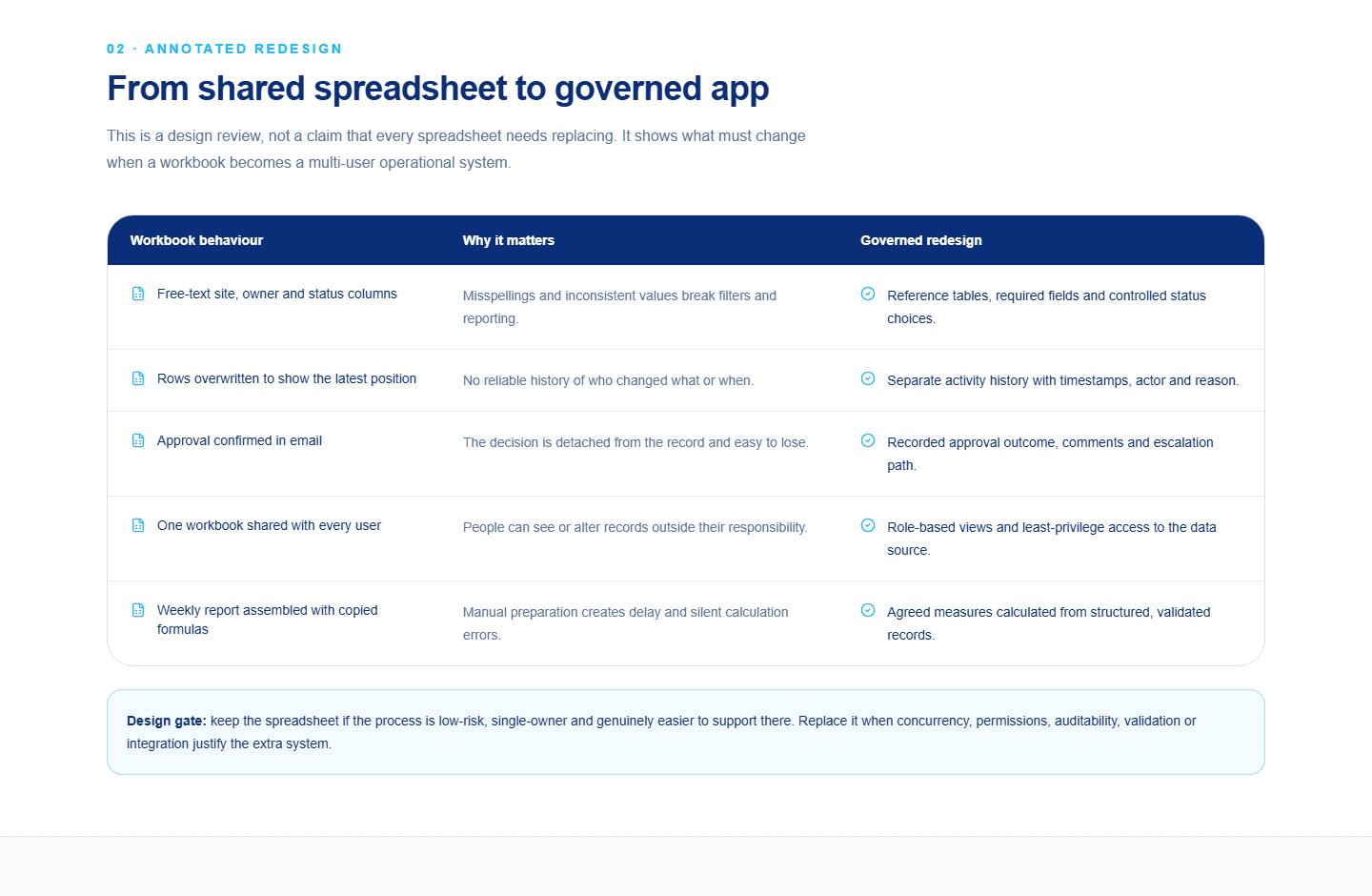
Spreadsheet redesign
See how free text, overwritten history, email approvals and broad access map to structured data, auditability and least-privilege design.
Review the annotated redesignSolvanto can help from early discovery through to delivery, testing, rollout, and ongoing improvement. We start by understanding the real process before recommending a tool. That matters because not every workflow needs the same level of build: some problems are best solved with Power Automate, some need a Power App, some need an Azure integration, and some need the process simplified before anything is automated.
This approach helps keep automation practical. It avoids creating complicated flows that only one person understands, and it makes sure the finished solution can be documented, monitored, changed, and supported by the business over time.
Map the current workflow, users, systems, pain points, exceptions, data inputs, outputs, and manual effort so the automation solves the right problem.
Define the best-fit solution using Microsoft Power Platform, Power Automate, SharePoint, Azure services, or lightweight integration patterns.
Deliver the automation with clear logic, validation, error handling, permissions, notifications, and real-world testing before it goes live.
Document the solution, support the rollout, explain how it works, and identify future improvements once the process is being used by the team.
Useful automation often starts with one painful process: repeated admin, constant chasing, unclear ownership, or work moving between too many systems. These problems are common in finance, operations, HR, sales, service teams, reporting teams, and growing businesses that have outgrown manual ways of working.
By using Microsoft Power Platform automation, Azure automation services, and sensible integration design, organisations can turn those manual processes into reliable workflows that are easier to follow, easier to audit, and easier to improve.
Automated approvals and business request workflows
Email, Teams, and notification automation
Data collection and validation processes
Scheduled reporting and status updates
Service desk and ticketing automation
Data synchronisation between internal systems
Exception handling and operational alerts
Manual spreadsheet process replacement
Automation can quickly become messy if it is built without structure. A flow that starts as a quick fix can become a critical business process, and that is where naming, documentation, permissions, monitoring, error handling, and ownership become important.
Solvanto focuses on clear ownership, sensible naming, secure permissions, maintainable design, and handover-ready documentation. The aim is not just to automate a task, but to create a workflow that your team can trust and your business can keep improving.
Designed for long-term ownership
Clear process logic and documentation
Sensible error handling and notifications
Security and permissions considered early
Answers to common questions about automating manual processes, Power Automate workflows, Microsoft 365 automation, systems integration, and supportable business workflow delivery.
Business automation is the use of digital workflows, apps, integrations, and rules to reduce repetitive manual work. It can help route tasks, send notifications, collect data, trigger approvals, update systems, and give teams clearer visibility over process status.
Solvanto can help automate approval processes, internal requests, notifications, data collection, reporting updates, task routing, spreadsheet-heavy workflows, service desk processes, finance admin, operational handoffs, and Microsoft 365 workflows.
Yes. Power Automate is often a good fit for Microsoft 365 workflow automation, approvals, reminders, SharePoint processes, Teams notifications, and data movement between connected services. For more complex or business-critical workflows, Azure services may also be used.
Yes. Many automation projects start with a spreadsheet that has become difficult to control. Solvanto can help replace manual spreadsheet processes with structured data capture, workflows, approvals, notifications, and reporting-ready information.
The best starting point is usually a process that is repetitive, slow, error-prone, difficult to track, or dependent on one person. Solvanto reviews the current workflow, systems, users, exceptions, and business value before recommending the right automation approach.
Yes. Automation can connect Microsoft 365, SharePoint, Power Platform, Azure, SQL, CRMs, ticketing tools, email, Teams, and third-party systems. The right pattern depends on the process, the data involved, and how reliable the workflow needs to be.
Automation should be built with clear naming, documentation, ownership, error handling, permissions, monitoring, and handover in mind. Solvanto focuses on supportable automation so workflows do not become hidden business risks.
Yes. Small and growing businesses often benefit from automation when manual admin, email chasing, spreadsheet updates, and repeated handoffs start taking too much time. The solution should be kept practical and proportionate to the size and value of the process.
Solvanto can help you review the process, identify where automation makes sense, and deliver a practical solution that your team can actually use. Whether you are looking for a Power Automate consultant, Azure automation support, workflow automation for Microsoft 365, or a better way to connect internal systems, we can help you move from a manual process to a cleaner, more reliable way of working.
The best place to start is usually one process that causes regular friction: a recurring spreadsheet, an approval that gets stuck, a reporting task that takes too long, or a system handoff that depends on someone manually copying information. From there, automation can create quick wins while building a stronger foundation for future improvements.